











Unleash
the potential
in your corporate screensaver, lock screen, wallpaper, browser and  more.

Vibe turns everyday desktop touchpoints into always-on employee communication channels, helping you reach people wherever they work.

Book Your Discovery Call Book Your Discovery Call
Decorative star graphic Decorative swirl graphic

Corporate Screensaver

Bringing sleeping screens to life

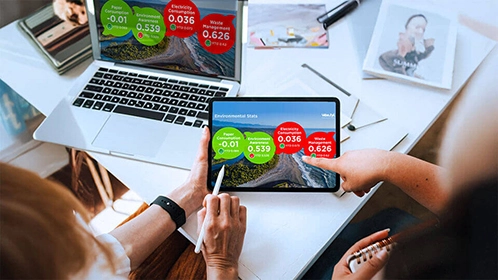
Vibe's corporate screensaver software turns idle employee screens into a high-visibility communication channel, helping organisations share important updates and companywide messaging without interrupting work.

Don't let your screens go silent. Vibe brings screensavers to life with dynamic, eye-catching content that keeps your people connected, your messages visible and your workplace story moving.

What is Vibe’s Screensaver channel used for?

Vibe’s Screensaver channel is used to display dynamic internal communication content when employee devices are idle. It is ideal for company updates, campaign messages, recognition, wellbeing content, safety reminders and other messages that benefit from regular visual reinforcement without interrupting employees while they work.

How does Vibe’s Screensaver channel help improve internal communication?

Vibe’s Screensaver channel helps important messages appear more often across the workday by using idle screens as a communication touchpoint. This gives internal communication teams a low-friction way to increase message visibility, support recall and reach employees without relying only on email or intranet posts.

Book Your Discovery Call Book Your Discovery Call Begin Your Fully Supported Trial Begin Your Fully Supported Trial

Lock Screen

Delivering priority info

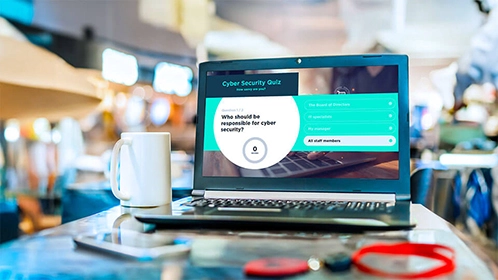
Vibe's lock screen software displays priority messages before employees log in, making it ideal for cyber security updates, urgent alerts and important reminders that need early visibility.

Make the first screen of the day count. Vibe turns lock screens into high-impact visual space for time-sensitive messages employees see before they start work.

What is Vibe’s Lock Screen channel used for?

Vibe’s Lock Screen channel is used to display important company messages before employees log in to their devices. It is well suited to priority updates, reminders, alerts, policy messages, compliance notices and other information employees should see at the start of their work session.

What is the benefit of using the lock screen for employee communication?

The lock screen gives organisations a highly visible communication point before employees access their desktop. This makes it useful for time-sensitive or important messages that need to be seen early, without requiring employees to open another app, email or intranet page.

Book Your Discovery Call Book Your Discovery Call Begin Your Fully Supported Trial Begin Your Fully Supported Trial

Background Wallpaper

Subtle, but impactful

Vibe's wallpaper software turns employee computer background into a subtle way to keep company vision, values and brand messages visible throughout the workday.

Keep your culture in the background, but never out of sight. Vibe turns desktop wallpaper into a quiet visual reminder of what your organisation stands for, appearing naturally as employees move between tasks.

What is Vibe’s Wallpaper channel used for?

Vibe’s Wallpaper channel is used to turn employee computer backgrounds into a subtle internal communication channel. It is ideal for reinforcing company values, brand campaigns, key dates, culture messages, awareness weeks and other messages that benefit from ongoing visibility throughout the workday.

How is Vibe’s Wallpaper channel different from screensaver or lock screen messaging?

Vibe’s Wallpaper channel provides a more constant and subtle communication presence because the message sits in the employee’s desktop background. Screensaver and lock screen messaging are more event-based touchpoints, while wallpaper is better suited to ongoing reinforcement and ambient communication.

Book Your Discovery Call Book Your Discovery Call Begin Your Fully Supported Trial Begin Your Fully Supported Trial

Web Browser Start Page

Activating a powerful page

Vibe’s browser communication channel turns an employee’s browser strart page into an interactive internal communications touchpoint, displaying relevant updates each time the browser is opened.

Desktop workers use their web browsers - a lot. Turn their usual browser page into another powerful comms channel. With Vibe, every time they open their browser they’ll be greeted by interesting, relevant and engaging interactive content.

What is Vibe’s Web Browser channel used for?

Vibe’s Web Browser channel turns an employee’s browser start page into an interactive internal communication touchpoint. It can be used to share company updates, quick links, campaign content, reminders, leadership messages and other information employees may need when they open their browser.

Why use the browser as an internal communication channel?

The browser is one of the most frequently used tools in the modern workplace, making it a valuable place to surface relevant internal communication. Vibe’s Web Browser channel helps organisations reach employees in the flow of work and gives them quick access to useful updates, links and content.

Book Your Discovery Call Book Your Discovery Call Begin Your Fully Supported Trial Begin Your Fully Supported Trial

Priority Notifications

When important messages can’t wait

Vibe Priority Notifications deliver urgent and high-priority messages directly to employee desktops through a prominent pop-up. Designed for time-sensitive communications that need immediate visibility without taking over the entire screen, notifications can require acknowledgement or simply be closed once read.

Cut through the noise when timing matters. Use Priority Notifications for IT outages, cyber security notices, operational disruptions, building updates, critical reminders and other important messages that need to be seen quickly, while allowing employees to continue working..

Book Your Discovery Call Book Your Discovery Call Begin Your Fully Supported Trial Begin Your Fully Supported Trial

Full-Screen Emergency Alerts

Critical messages that demand immediate action

For serious incidents where employees need to stop what they are doing and take immediate action, Vibe Emergency Alerts take over the entire screen with a highly visible message and clear instructions.

When every second counts, make sure the message can’t be missed. Use Full-Screen Emergency Alerts for evacuations, lockdowns, serious health and safety incidents, severe weather, security threats and other critical situations where immediate employee awareness and action are essential.

Book Your Discovery Call Book Your Discovery Call Begin Your Fully Supported Trial Begin Your Fully Supported Trial

Vibe works for large, complex businesses
and it will work for you, too.

Bring hybrid workers closer

Keep your remote and hybrid teams feeling informed, included, and connected. Vibe may even inspire a little FOMO – encouraging WFH employees to reconnect with workmates in the office.

Target messaging with ease

Ensure the right messages reach the right teams through the best channels. Vibe’s targeted communication software enables tailored content to be delivered precisely and effectively.

Effortless 'Set & Forget' scheduling

Improve efficiency and effectiveness. Vibe's scheduling tools enable you to plan ahead and campaign content across work screensavers, lock screens, wallpaper and browsers to optimise reach, engagement and retention.

Access a 'Ready-to-Go' template library

Enjoy an extensive visual armoury at your fingertips. With Vibe, all the layouts, animations and designs are done for you. So you can focus on what matters most - the message. 

Featured Use Cases and Customer
Success
Stories

Are Corporate Screensavers Sustainable? Energy Use, Cost and Communication Value Explained

Are Corporate Screensavers Sustainable? Energy Use, Cost and Communication Value Explained

Read More
Employee Communications in the Age of the Attention Crisis

Employee Communications in the Age of the Attention Crisis

Read More
The Enterprise Employee Screensaver: Reimagined for the Modern Workplace

The Enterprise Employee Screensaver: Reimagined for the Modern Workplace

Read More
Desktop Screensavers Powering Healthcare Communication at the NHS

Desktop Screensavers Powering Healthcare Communication at the NHS

Read More

See all digital signage software
features in action

Book a demo to discover how these powerful features can help your
organisation bring high-value communications to life with Vibe.fyi

Book Your Discovery Call Book Your Discovery Call Begin Your Fully Supported Trial Begin Your Fully Supported Trial

Frequently Asked Questions

Here are some questions we get asked about our Lock screen software, wallpaper and corporate screensaver software. If we haven't answered your question, we'd love to hear from you!